
TNT SIM Registration Online

TNT SIM registration can be completed online through the official Smart registration portal. Enter your TNT mobile number, verify the OTP, provide your personal information, upload a valid ID, and complete the selfie verification. Registration is free, and you can also register through the GigaLife app or get assistance at a Smart Store.

How to Register TNT SIM

There are 3 different methods for SIM registration TNT. You can use any of the methods according to your preference to register your Talk and Text SIM. 

  • TNT SIM Registration online via the portal
  • Registration VIA the GigaLife app
  • In-person registration in stores 

All the registration methods are 100% safe and secure. You can choose any of these methods and complete your SIM reg TNT. 

Note: The method of SIM registration for Filipino nationals, minors, companies, and foreigners is almost the same. However, the requirements vary in each case.

Register TNT SIM Via Portal

To register your TNT SIM card online via the portal, simply visit the Talk and Text portal and complete the registration form. Here is the detailed breakdown of it:

  1. First of all, visit the official SIM registration site or click on the TNT registration link given below.
  1. Enter your TNT mobile number carefully in the required field. Ensure that you have entered the accurate number.
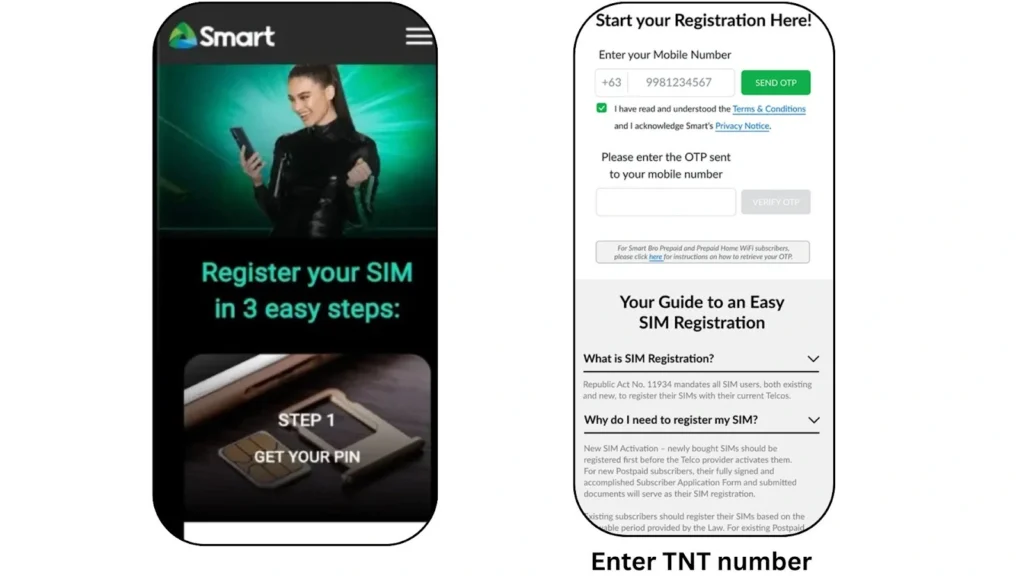
Two mobile screens showing TNT SIM registration process, left with green ad background, right with white form for mobile number and OTP
  1. Read the “Talk and Text” terms and conditions carefully. Tick the box to agree to the Terms & Conditions and Privacy Notice.
  2. You will receive OTP on your TNT mobile number. Enter the OTP on the website and submit it.
  3. Fill out the registration form with your personal details. Always provide the required details according to your official documents. 
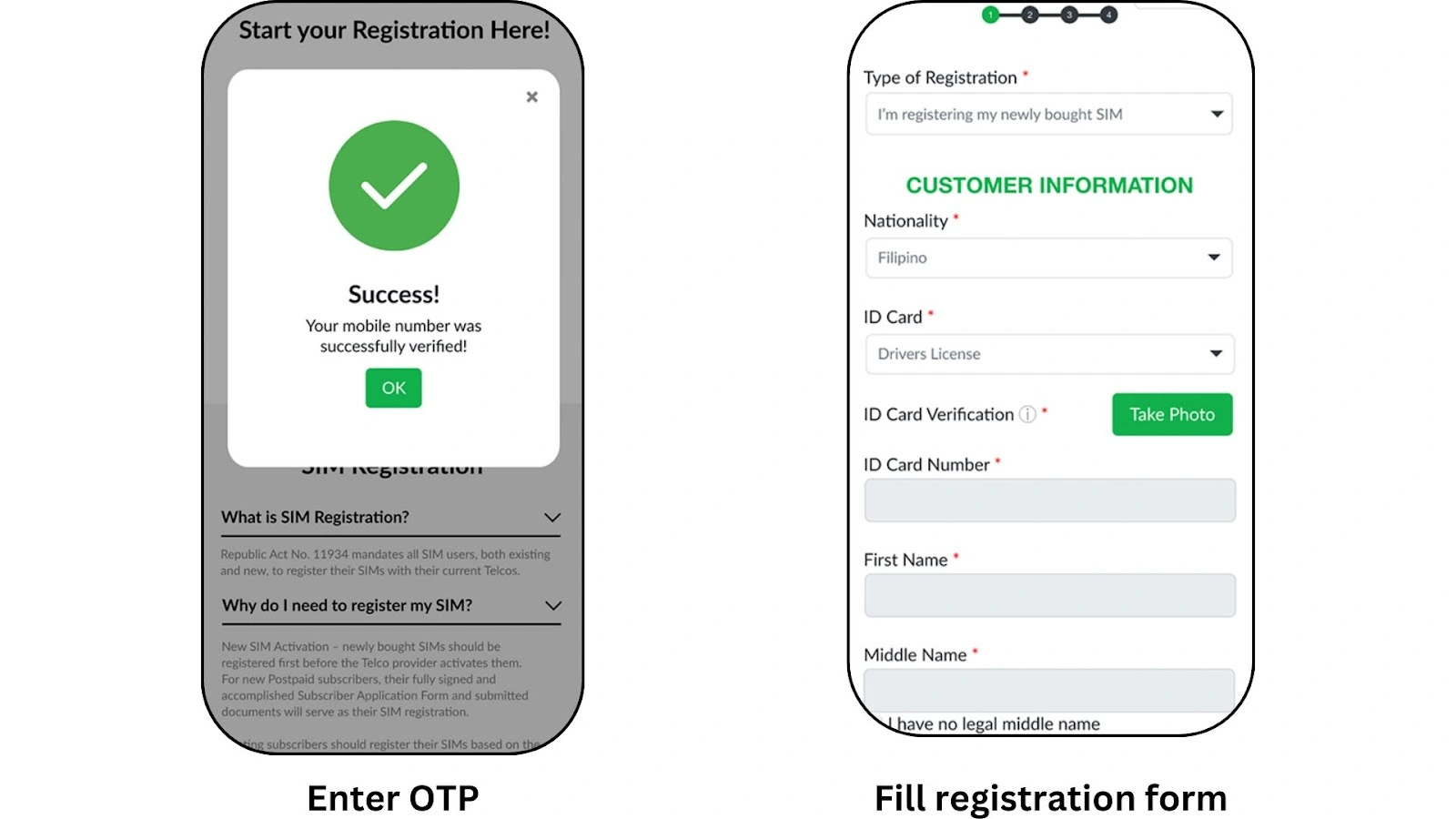
Left screen shows mobile number success message, right screen shows customer information form with registration details.
  1. Please upload a clear photo of your valid government-issued identification. The photo must be clearly visible and readable. 
  2. Take a selfie for identity verification.
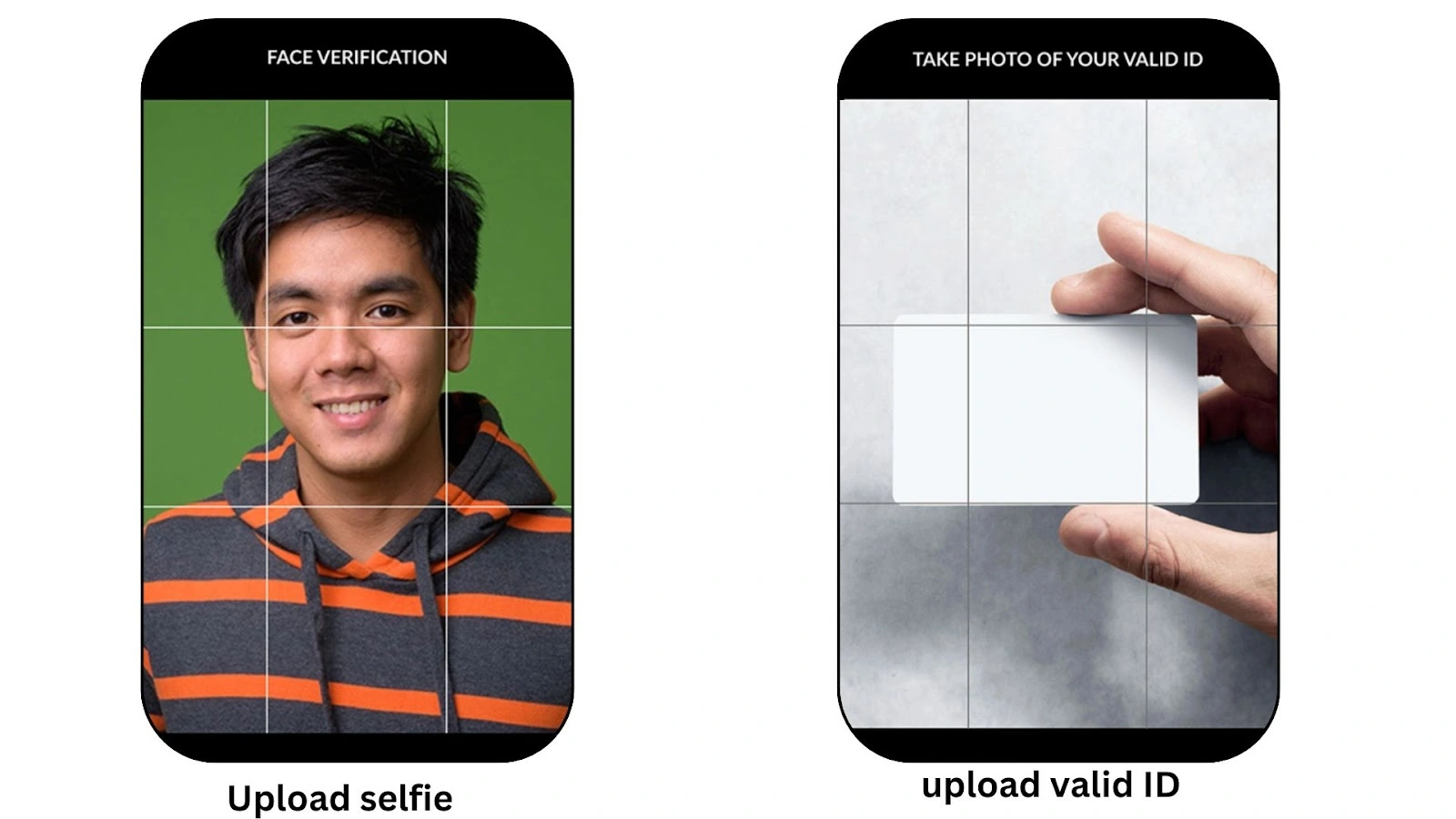
Two smartphone screens showing face and ID verification, left with a smiling Filipino man showing the registration selfie, right with a hand holding an ID card.
  1. Add alternative contact details. Make sure that the number and Email you are adding are correct and active. 
  2. Your info from the ID will be auto-filled into the form. Review all your details carefully and click Next to finish the process. 
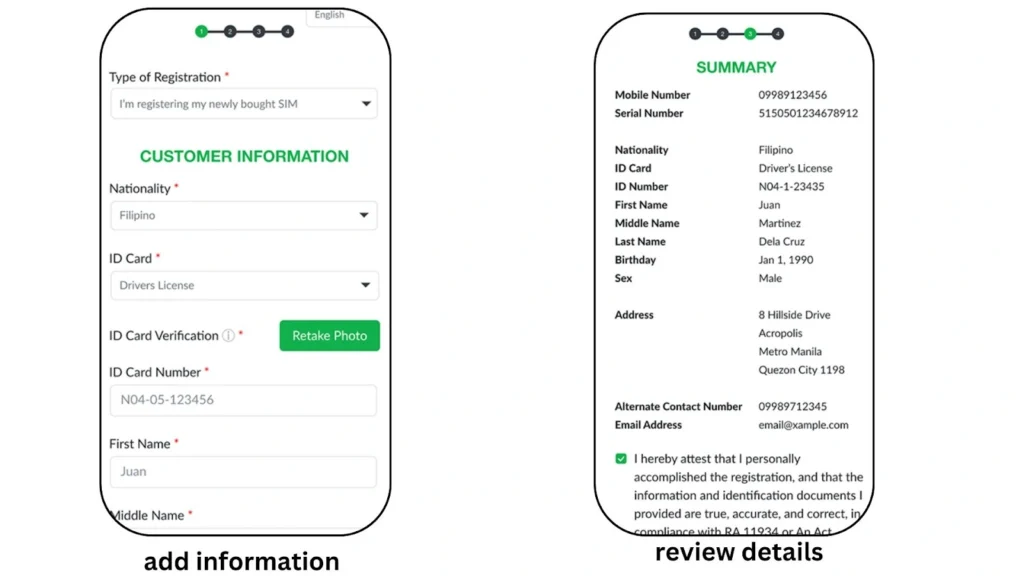
Left smartphone showing customer information form with registration type, right showing summary of Filipino personal details with confirmation checkbox.
  1. You will get a congratulations message with the control number. Save the control number and wait for the confirmation message from TNT.
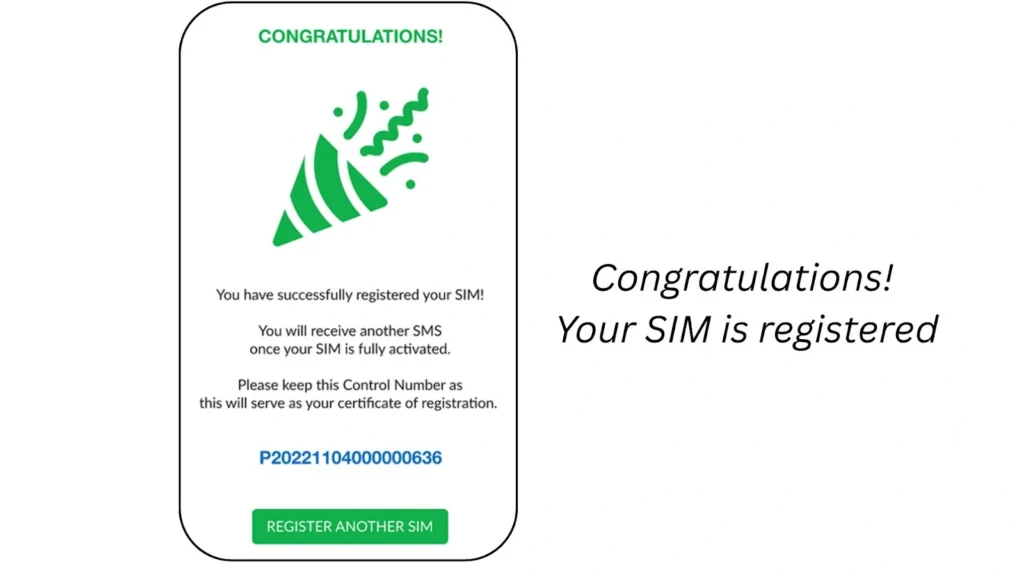
Mobile notification showing successful TNT SIM registration with congratulatory message and registration control number.

TNT SIM Registration Via APP

The process of registering a SIM card with TNT via the app is almost the same as the portal. However, I have provided a detailed tutorial about it for your ease.
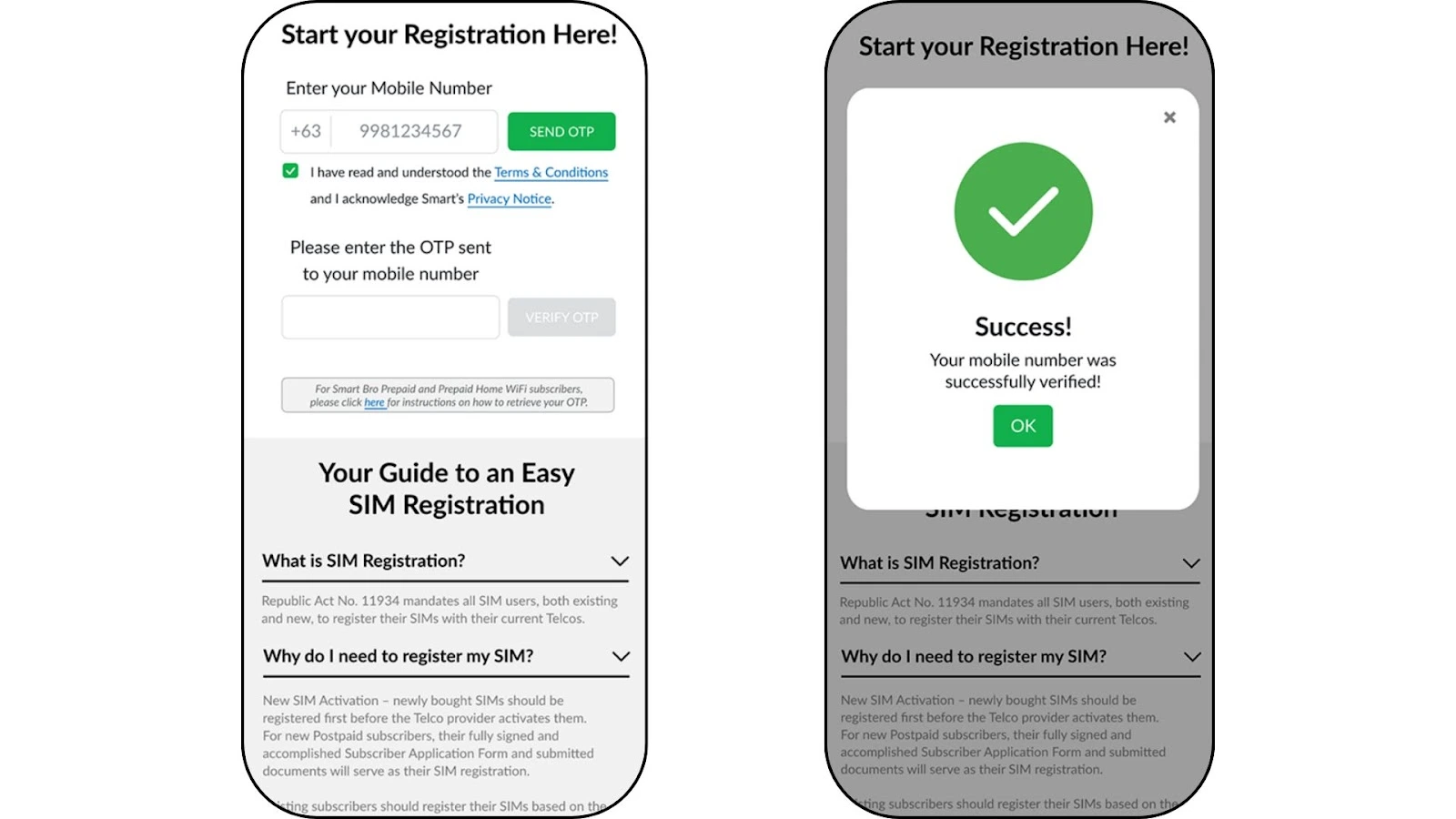
  • First of all, download the GigaLife app
  • Once the app is downloaded, open the app and click on the SIM registration option. 
  •  Enter your 11-digit mobile number and click the submit button. 
  • You will get an OTP on your TNT number. Enter the OTP in the required field to verify your number. 
tnt sim registration via app
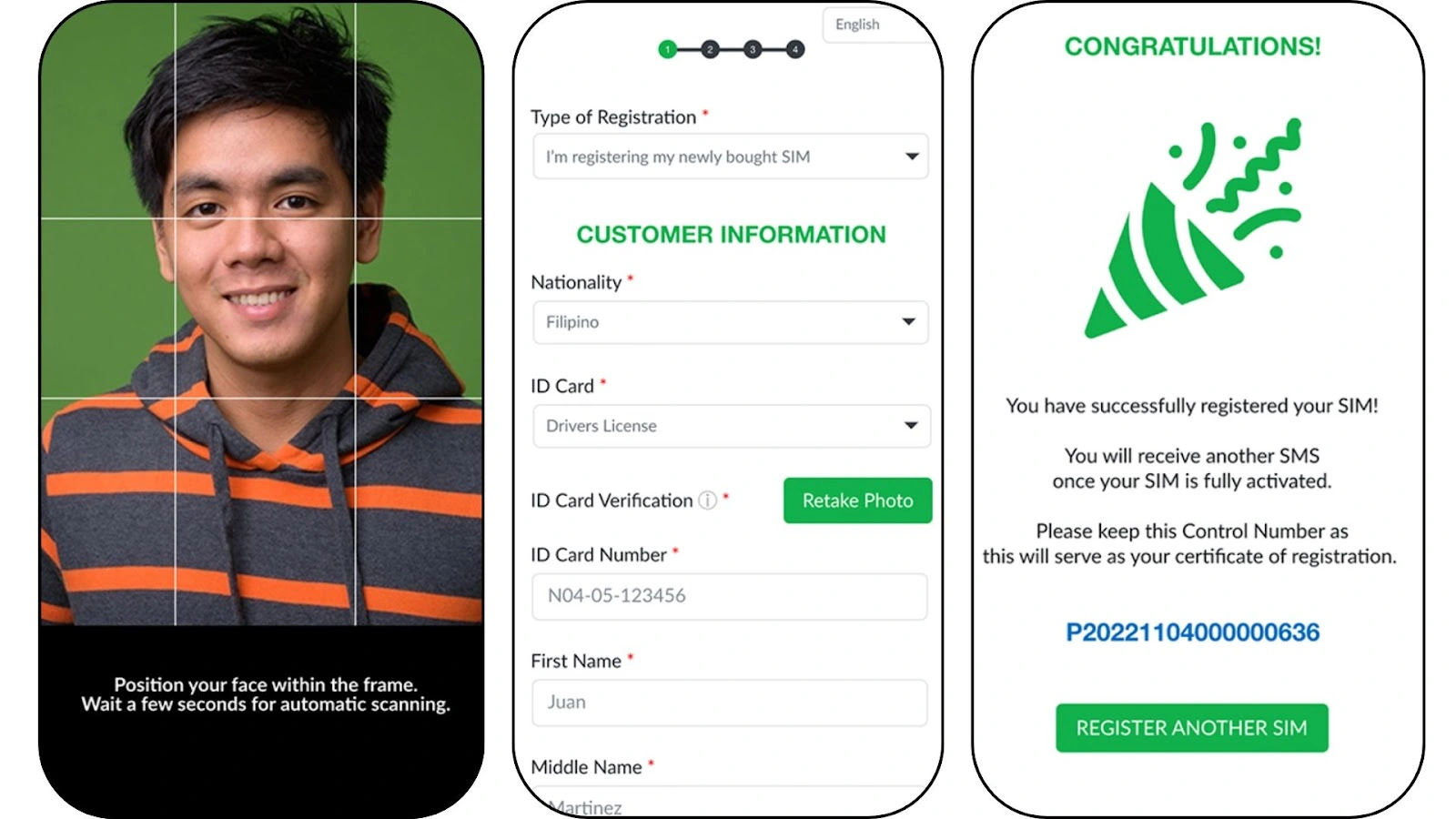
  • Fill out the form using accurate personal info based on your valid ID.
  • Upload a clear photo of your government-issued ID and take a selfie for verification.
  • The system will auto-fill your details from the ID.  Double-check all the details and make corrections if needed.
  • Once done, submit the form, and you will get a congratulations message with your control number. Save the control number for future use. 
Three mobile screens for TNT SIM registration showing a Filipino’s face scanning, customer form, and confirmation message.

In-Person Registration

Smart Communications also provides the option for in-person registration if you are not comfortable with the online process. Here is how you can register a SIM card with TNT in stores with in-person assistance:
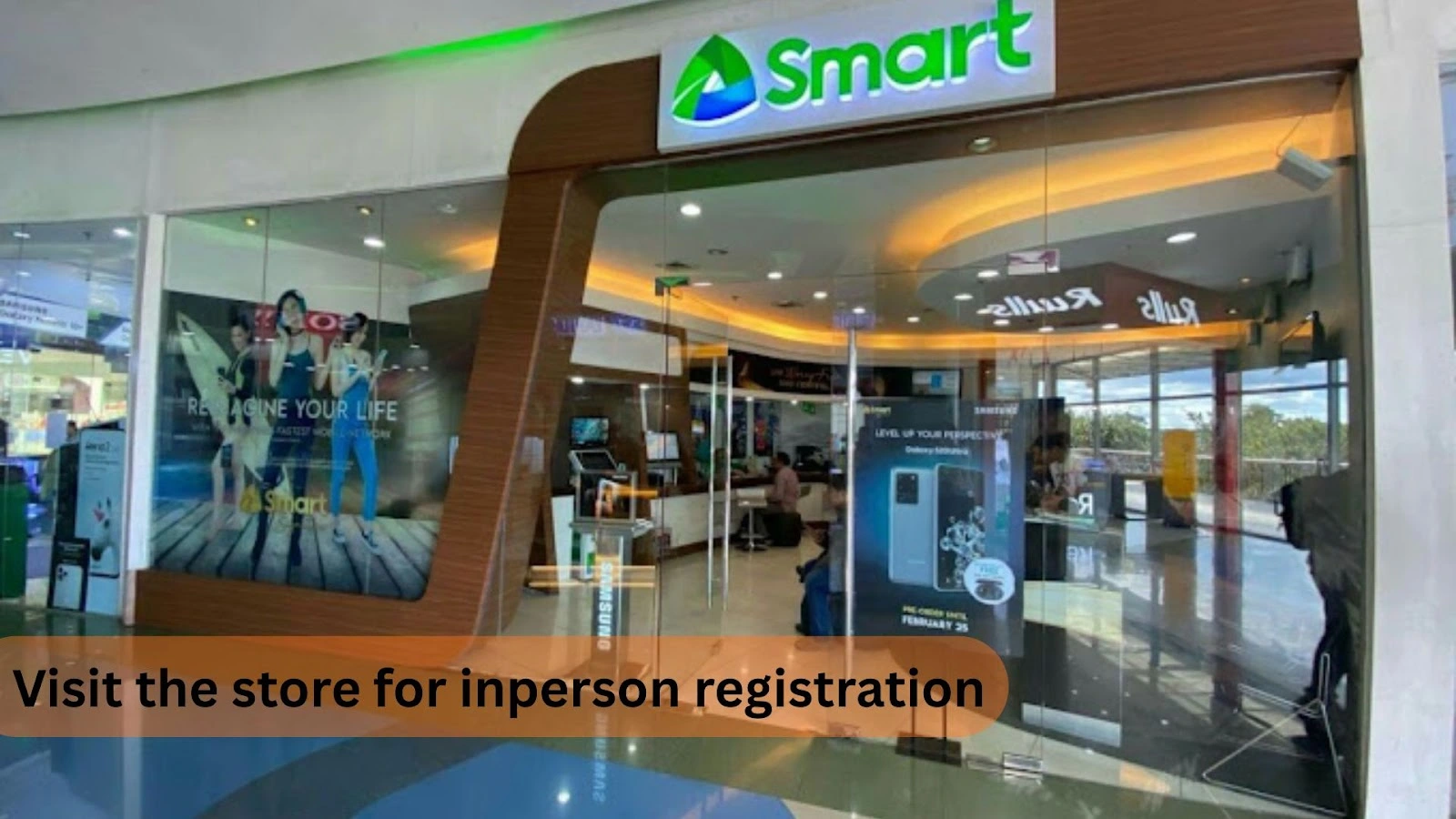
  • Visit your nearest Smart Communications store and bring the valid documents along with you. 
  • Ask the attendant for SIM registration. 
  • You will be asked to provide some important details and documents. 
  • The attendant will assist you in completing your SIM registration.
Glass storefront of a Smart store with a poster, display counters, and people inside for in-person TNT registration in the Philippines.

I always prefer to register the SIM online via the portal. It is because the process is simple and comparatively fast. However, you can use any of the available methods safely without any issue.

How To Check Registration Status

Once you have completed the process of SIM registration, you can track your registration status. Here is how to check your registration status:

Check Registration Status Through Portal

  • Go to simreg.smart.com.ph.
  • Enter your 11-digit TNT SIM number.
  • Verify using the OTP sent to your phone.
  • You will receive a confirmation message about your registration status.

Check Status Using Smart APP

  • Open the Smart app on your mobile phone.
  • Log in to your account.
  • View your registration status, where your phone number is shown in the app.

Check by Visiting Smart Store

  • Go to the nearest Smart store.
  • Bring the necessary documents with you.
  • Ask the staff to check your registration status for your TNT SIM.

How To Activate a TNT SIM Card

TNT SIM Registration Requirements

Here is the list of SIM registration TNT requirements. You must fulfill these requirements to register the SIM card in the Philippines.

For Philippine Nationals

Here is the list of requirements for nationals:

  • Valid government-issued ID such as Passport, PhilID, Driver’s License, SSS ID, GSIS ID
  • Full name
  • Date of birth
  • Address & Gender
  • A recent selfie photo

For Minors

Here is the list of requirements for minors:

  • Valid government-issued ID of guardian
  • Birth certificate of the minor 
  • Consent letter from parent or guardian
  • Minor’s full name, date of birth, and gender
  • Guardian’s full name and contact details
  • Selfie photo of the guardian

For Companies

Here are the requirements for companies:

  • Company registration certificates, e.g., SEC registration, business permit
  • Authorized representative’s valid government-issued ID
  • A letter of authorization from the company for the representative
  • Authorized representative’s full name, position, and contact details

For Foreigners

Here are the requirements for foreigners:

  • Valid passport
  • Proof of Philippine address 
  • Return or onward ticket 
  • Full name
  • Date of birth
  • Gender
  • Philippine address for contact
  • A recent selfie photo 
  • NBI Clearance

TNT SIM Registration Rewards and Free Data

TNT offers 3 GB of free internet data on successful SIM registration as a registration gift. You can receive this bonus with a confirmation message of registration. Register your SIM now and enjoy 3 GB of internet data for free. 
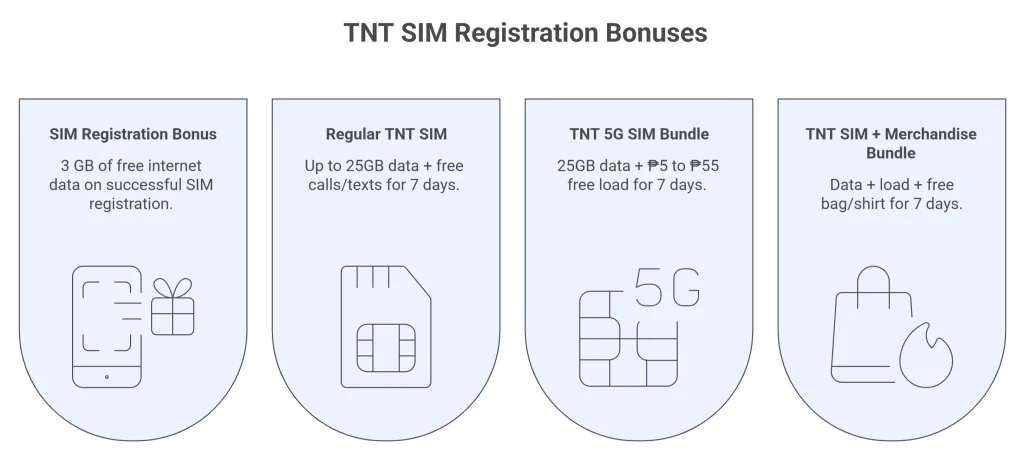
Infographic shows four TNT SIM offers: free data, calls and texts, 5G bundles, and merchandise incentives for users.

TNT SIM Registration Problems and Solutions

Although the process of SIM registration TNT is simple, many users face some common issues.
Here are the proven solutions for the issues:

OTP Not Received

Sometimes, the users failed to receive the OTP. This issue usually occurs due to providing the wrong phone number or a poor network connection. Here is how to overcome this error:

  • Make sure that you have provided the correct number. Double-check the number before submitting it.  
  • Always connect with a proper internet connection while registering. Try TNT SIM APN for fast internet.
  • Sometimes, the SMS reaches the spam folder automatically. Check the spam box of your SMS app.

ID Upload Issue

ID upload issue occurs when you upload an expired or incorrect ID. This is not a big issue and can be solved by taking a few simple steps.

  • The maximum accepted size of ID is 2MB in JPG and PNG formats. Reduce the size if it exceeds the maximum limit. 
  • Always upload a valid, official, and up-to-date ID. Avoid using the expired or damaged ID. 
  • Make sure that the ID photo you are uploading is clean and clear. All the details and photos are visible. 

Selfie Upload Issue

A common issue users may encounter is selfie verification failure. However, you can solve it by following these simple steps:

  • Always upload a fresh and clear selfie and ensure that your face is visible. 
  • Avoid using any filters and effects on the selfie. Upload a clear and simple selfie. 
  • Check that your camera lens is clean and you are close to the camera. 

10009 Code Error

Recently, a lot of users have reported that they face Error Code 10009 after submitting the SIM registration form. This issue occurs when you provide wrong and irrelevant details. Here is the quick solution to it:

  • Double check the details before submitting the form and ensure the accuracy.
  • Always provide the details according to the official documents.

Benefits Of SIM Registration

There are several benefits of registering your TNT SIM. Completing the registration not only keeps your SIM active but also gives you access to exclusive promos, better security, and improved services. Below are the top six benefits you will enjoy:

Infographic showing the benefits of TNT SIM registration, including law fulfillment, fraud prevention, promo eligibility, improved support, and security enhancement.

Tips for Successful TNT SIM Registration

Here are some practical tips that I always follow for smooth SIM registration:

  • Always enter an accurate 11-digit TNT mobile number. Double-check that you have entered an accurate mobile number
  • Always use a valid government-issued ID and ensure the details exactly match what you enter in the registration form.
  • Upload a clear, recent selfie photo holding your ID for easy facial verification.
  • Double-check all personal information entered to avoid delays caused by incorrect data.
  • If registering online, patiently wait for the OTP and enter it promptly to verify your mobile number. Enter the OTP as soon as possible before it expires. 
  • If your SIM got locked, try TNT SIM PUK code to unlock it.
  • If you have not received the OTP, check the spam folder of your messages app before requesting again.

Smart TNT Helpline Details 

Call 

via Phone (02)8888-1111 
via Mobile (*888 toll-free)

Messenger Chatbot

Chat with the AI messenger chatbot

FAQs

You can register your TNT SIM online through the official Smart SIM registration portal, through the GigaLife app, or with assistance at a Smart Store. For online registration, enter your TNT number, verify the OTP, provide your personal details, upload a valid ID, and complete selfie verification.

Once you have registered your TNT SIM, insert SIM in your mobile, and you will get a confirmation message along with 3 GB registration bonuses. You can also activate the TNT SIM by dialing *123#.

You can easily check your TNT SIM registration status in three ways. First, visit the online portal at simreg.smart.com.ph, enter your 11-digit TNT number, and verify it with the OTP sent to your phone. You will get a confirmation message right away. Second, open the Smart app on your mobile, log in, and view the registration status displayed with your phone number. Lastly, you can visit the nearest Smart store with your documents and ask the staff to check your registration status for you. These simple steps help you stay informed and ensure your SIM is properly registered to avoid service interruption.

Yes, the registration SIM TnT is 100% free. There is no registration fee or charges. However, the TNT offers 3GB of free data on successful registration.

Contact the TNT helpline in case of registration failure by dialing 028888-1111 or 888. The helpline will provide you with a possible solution as soon as possible.

The TNT SIM for minors will be registered with the details of parents or guardians. The minors are not eligible to register a SIM on their personal details.

If you failed to get OTP, check the spam folder of your messages app. Hopefully, you will get the OTP there. If you still fail, you can request a new OTP.

You can register your SIM by calling one of these TNT registration numbers ( 028888-1111 or  *888). You will get detailed assistance to register the TNT SIM.